.png)
Cyber Wellness
Find guides, tips, and links to support your child's learning and well-being at home.
1. Understanding Screen Use: National Insights
National Context & Screen Use Data
Early Digital Engagement: Research from Milieu Insights (reported by The Straits Times,(opens in new tab)(opens in new tab) (opens in new tab) Feb 2021) shows that 67% of children aged 7 to 9 and 85% of those aged 10 to 12 in Singapore use smartphones daily and are active on social media.
Impact: Both screen time and the type of screen use (educational vs. recreational) significantly impact children's well-being, highlighting the need for balanced and purposeful use.
2. Ministry of Health (MOH) Screen Use Guidelines
To protect children's health, development, and well-being, MOH provides clear age-specific recommendations (January 2025 Advisory):
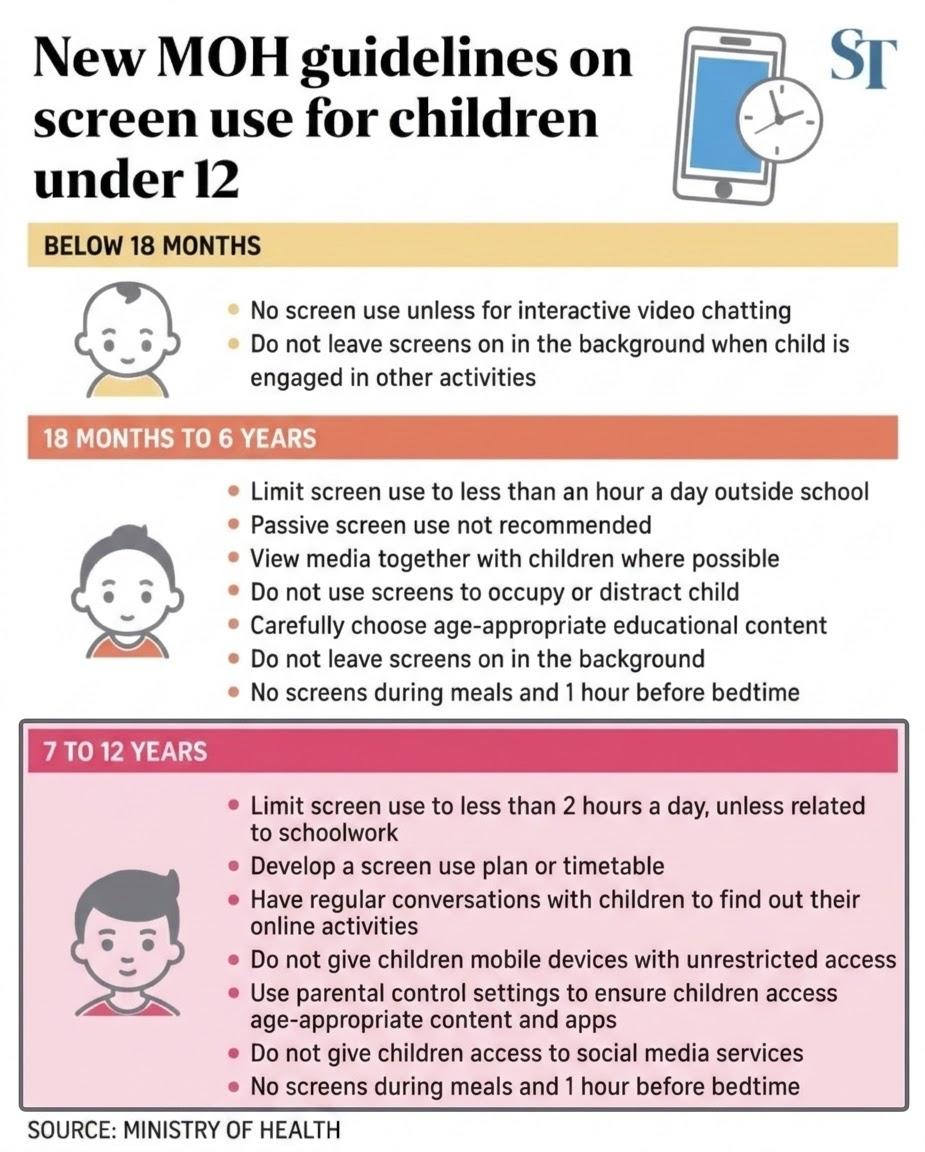
For Children Aged 7 to 12 Years Old

Time Limit: Limit screen use to less than 2 hours a day, unless it is related to schoolwork.
Routines & Boundaries:
Agree on a screen use plan or timetable.
No screens during meals and 1 hour before bedtime.
Content & Supervision:
Use parental control settings and check age-appropriate content ratings.
Talk to your child often about what they view online and offer regular advice.
Do not give children access to social media (users to be at least 13 years old).
Do not give children mobile devices with unrestricted access to the internet and applications.
3. Preparing Your Child for a Smartphone or Smartwatch
Before handing over a personal device, parents are encouraged to assess readiness carefully using these key reflection questions:
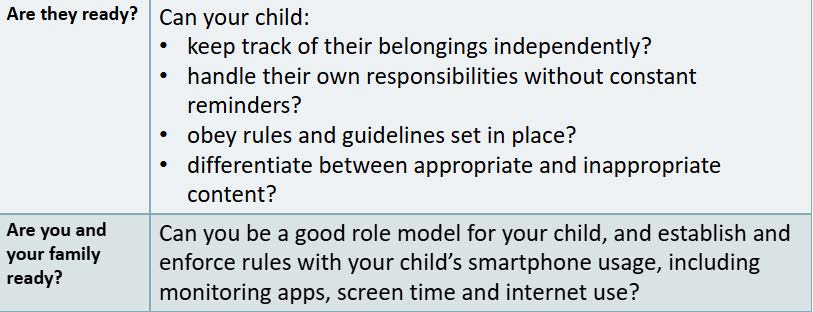
Note: If you answer 'no' to any of these questions, it is wise to wait until your child is older—ideally in secondary school.
Alternatives for Parents Not Ready Yet:
Basic phones or smartwatches offering calling and texting functions without internet access or apps.
Set a future review date or target age to reassess readiness.
4. Practical Strategies & Parental Controls
When you decide your child is ready, provide structure, active supervision, and open communication rather than simply handing over the device:
Set Up Parental Controls: Most phones allow parents to:
Limit usage times: Control times of day and duration of use.
Restrict content: Block access to age-inappropriate material.
Manage activities: Permit specific apps/games, manage friend lists, and control private messaging.
Safeguard against spending: Restrict app store and in-app purchases.
5. Fern Green Primary School's Cyber Wellness Programme & Initiatives
At Fern Green Primary School, our Cyber Wellness framework equips students with vital digital citizenship skills:
CCE (FTGP) Lessons: Students learn to:
Be a positive peer influence online and manage digital footprints.
Stand up against cyberbullying and peer pressure.
Protect themselves against phishing, spam, scams, hacking, and online falsehoods (using the National Library Board's S.U.R.E. framework: Source, Understand, Research, Evaluate).
Understand the impact of inappropriate content and reject it using the 'Stop-Think-Do' strategy, recognising that sharing or forwarding such material is an offense.
ICT Champions & Student Advocacy:
Student ICT Champions lead assembly programmes and recess activities advocating for good digital habits, responsible word choices, and anti-cyberbullying campaigns ("Don't be Mean, Stop Cyberbullying").
"Family Tech Fridays!" & CTRL+PARENT:
FGPS bite-sized videos designed to partner parents in taking control of your child's cyber world.
Check out our past Family Tech Fridays (FTF) videos below!